
Your AI Agent is moving to Agent 2.0
Starting 1 December 2026, Zaapi will automatically migrate every AI Agent to Agent 2.0. No rebuilding is required. Existing knowledge, Scenarios and settings move with you, while Procedures, Actions and improved testing expand AI customer service automation.
From Tuesday 1 December 2026, we'll gradually move every AI Agent to Agent 2.0, so your store will update at some point that week. You don't need to do anything. Your knowledge, Scenarios and AI settings come with you, and your AI keeps answering customers throughout.
Agent 2.0 is a rebuild of the Zaapi AI Agent. Until now, your AI could answer questions. Once your store moves, it can also follow your step-by-step processes and take actions, like looking up an order or handing a chat to your team. Your price doesn't change.
What's new in Agent 2.0
The biggest change is that your AI can now do things, not just reply.
Procedures are step-by-step instructions written in plain language, like briefing a new team member. For example: ask for the order number, look up the order, then share the delivery status.
Actions happen inside a procedure, exactly where you place them. Order lookup and product search for Shopee, Lazada, TikTok Shop and Shopify also work on their own, whenever the AI needs them.
How Agent 2.0 is organised
In 2.0, your knowledge, procedures and actions live in one shared library. You attach them to an agent, and the agent works on the channels you choose. Update something once and every agent that uses it gets the change.
Most stores need just one agent. Businesses with several brands or markets can add more, up to 100, without copying their knowledge. Each channel account is handled by one agent at a time.
When and how your store moves
What your setup becomes
- One AI setup across all your channels: it becomes a single agent called AI Agent. Same knowledge, same behaviour.
- Different setups on different channels: in 1.0, settings were attached to each channel account. In 2.0 they belong to an agent, so each of your setups becomes its own agent, covering the channels it covered before.
- Your Scenarios become Procedures, and your AI persona becomes the agent's instructions.
Your price doesn't change. You're charged only when the AI sends a customer a message, as today. Actions and test chats don't cost anything extra.
A first look
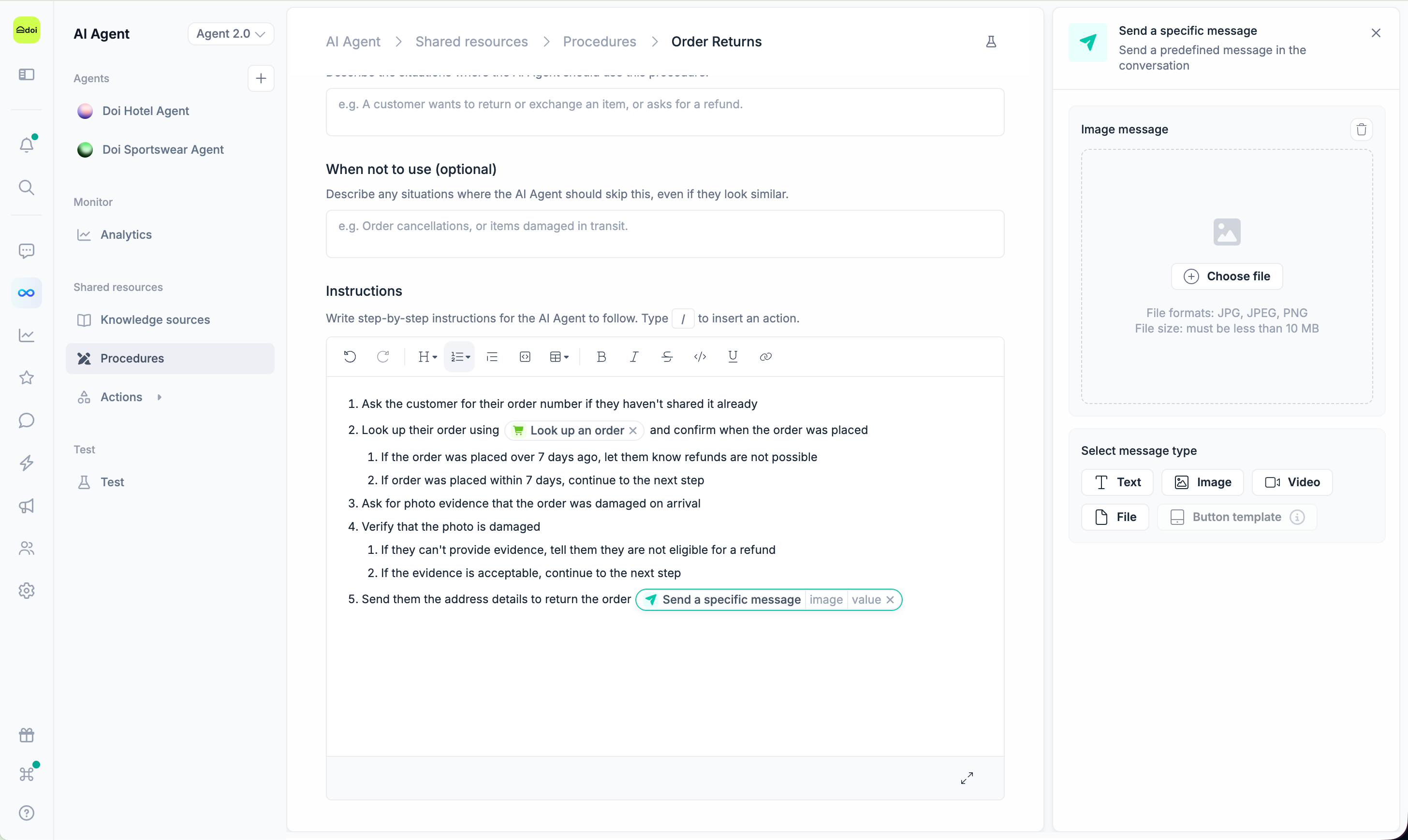
Procedures with actions built in. Write the steps your team follows in plain language. Type / to add an action exactly where it should happen, such as looking up an order or sending your return address.
After the move
There's nothing you have to do. When you're ready, these are worth five minutes each:
- Check your agent. Open AI Agent and look at your agent's instructions, language and channels.
- Ask it your top questions in the test chat, and click a reply to see the reasoning behind it.
- Add your first procedure for your most common request, such as "Where is my order?". Type
/to add an order lookup.
Frequently Asked Questions About Zaapi Agent 2.0
Will my Zaapi AI Agent stop working during the Agent 2.0 migration?
No. Your AI Agent will continue answering customers before, during and after the migration. There is no action required from your team.
Do I need to rebuild my AI Agent setup?
No. Zaapi will automatically migrate your existing knowledge, settings and AI persona. Your Scenarios will be converted into Procedures.
Does Zaapi Agent 2.0 cost more?
No. Your pricing remains unchanged, and Agent 2.0 is available on every Zaapi plan. Actions and test chats do not cost extra.
Do I need a developer to use Agent 2.0?
No. You can set up agents, knowledge, Procedures and supported Actions directly in Zaapi without coding. A developer is only needed if you want to connect your own system, such as a CRM, loyalty platform or booking system, through a custom action.
Where can I learn how to use Zaapi Agent 2.0?
Visit the Zaapi Agent 2.0 Help Centre for step-by-step setup guides, feature explanations and migration information. You can also contact the Zaapi support team for assistance.
